
What an Access Log for a Shared Page Tells You
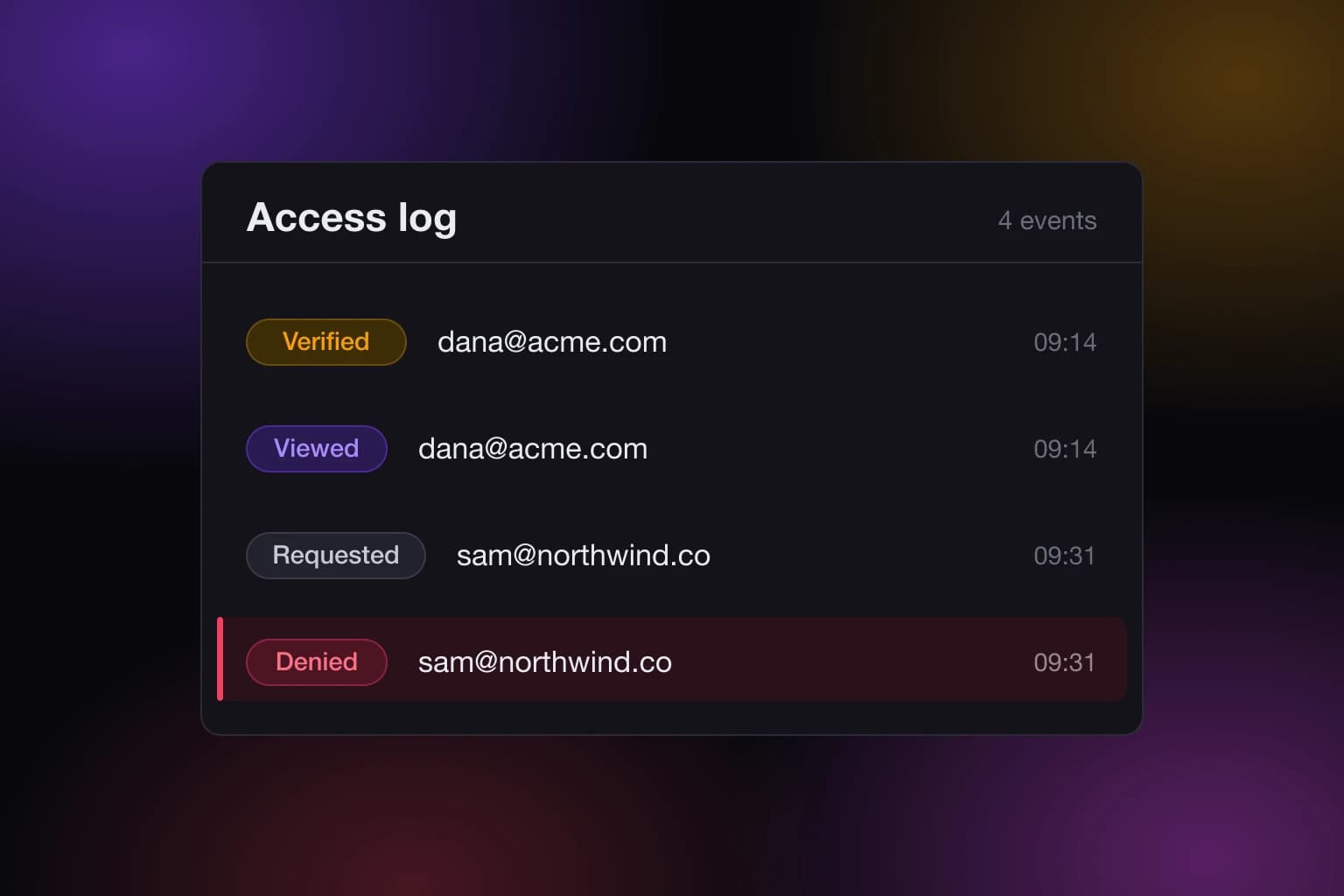
You sent someone a link to a page you published, and now you want to know what happened to it. The access log for a shared page is where that answer lives, and it is more specific than most people expect: it records who asked for access, who proved their email, who opened the page, and who was turned away.
That last group is the one people forget exists. A log that only counts successful views tells you your page is popular. A log that also records refusals tells you when someone is knocking on a door you did not open for them.
What an access log for a shared page actually records
Every SnapHost site keeps a log of four kinds of event: requested, verified, viewed, and denied. In the dashboard they read as Requested, Verified, Viewed, and Denied. Each row stores the viewer's email, which of the four events it was, the visitor's IP address, the user agent string their browser sent, and the moment it happened.
The log belongs to one site. There is no single firehose across your whole account, which is deliberate: the question you are usually asking is about one specific thing you sent to one specific group of people.
The four events, and what each one means
Requested is someone asking to be let in. They arrived at a private page, they were not on the list, and instead of a dead end they asked the owner for access. The row is the ask, not the answer.
Verified is someone proving they control an email address. On a private site, being on the allowlist is not enough on its own. The viewer has to confirm the address is theirs before the page opens. A Verified row is that moment.
Viewed is the page actually being served to someone. This is the row most people go looking for, and on its own it is the least informative of the four.
Denied is an attempt that did not work. Someone reached the page and did not get in.
The sequence matters more than any single row. A Requested with no Verified after it is a person who wanted in and gave up, or who you have not answered yet. A Verified with no Viewed is stranger: someone confirmed their email and then did not open the page. Neither of those shows up anywhere else.
Why a denial is the most useful row
A Viewed row confirms something you probably already assumed. A Denied row is new information, and it usually means one of three things.
The first is a typo or a stale link, which is boring and fixable. The second is that you shared the link with someone and forgot to add them, so a colleague you meant to include has been staring at a locked page while you assumed they had read the thing. The third is that the link travelled somewhere you did not send it.
None of those three announce themselves. You find out by looking, or you do not find out. If you are choosing between an allowlist and a shared password, this is one of the arguments for the allowlist, and we made the rest of that case in allowlists vs passwords. A password cannot tell you who failed to guess it, because a password has no idea who anyone is.
What the log shows you, and what it stores but does not show
The row in the database holds the email, the event, the IP, the user agent, and the timestamp. The table you read in the dashboard shows three of those: the event, the email, and when it happened.
The IP and the user agent are recorded but not displayed. That is a reasonable default and worth knowing about, because it means the log is built to answer "who and when", not "from which network and on which browser". If you were hoping to geolocate a viewer from the dashboard, that is not what this surface does today.
It is also worth being clear about what an IP address is worth even when you have it. It identifies a network connection at a moment in time, not a person. Two people in one office share one. A phone on mobile data changes its own regularly. The email address on the row is the identity claim here, and it is the one that was actually verified.
Reading the log on a public site
A public page logs its visits too. There is no verified email to attach, so the email field is empty and the entry renders as Anonymous visitor.
This is useful and limited in exactly the way you would guess. You can see that the page is being opened and roughly how often. You cannot tell two anonymous visitors apart, and you cannot tell whether one person opened it eight times or eight people opened it once.
If that distinction matters for the thing you are sharing, the answer is not a better log. It is a private page with email-verified viewer access, which is what puts a name on the row in the first place. The log gets more informative because the gate got stricter, not because the logging changed.
Whose name lands on the row
Allowlist entries come in two shapes. You can add one specific address, or you can add a whole domain so that anybody at that company can get in.
When a viewer's email matches both, the specific entry wins for the purpose of the log. If dana@acme.com is on your list by name and acme.com is on it as a domain rule, the log records Dana, not the domain rule that would also have admitted her. The most specific identity available is the one stamped on the view.
This is a small detail with a practical consequence. Adding a domain rule to save yourself typing does not turn your log into a list of anonymous employees. It stays a list of people, as long as those people verified an address.
What the log cannot tell you
It records what the server saw. It does not record what happened next.
It does not know whether the page was read or glanced at and closed. It does not know whether someone screenshotted it, copied the text out, or read it over a shoulder. Once a page has been served to a person you approved, what that person does with it is outside anything a log can observe. Any tool that suggests otherwise is selling you a feeling.
It also cannot tell you about a view it never handled. A page held in a browser's cache and reopened is not a fresh request to us, and an automated crawler hitting a public link is a Viewed row that has nothing to do with a human.
Read the log for the shape of the traffic and for the identities on private pages. Do not read it as an attendance register.
Where to find it, and how to read a long one
The log sits inside the "Who can view" card on a site's page in the dashboard, collapsed by default so it does not crowd out the sharing controls you touch more often. Open it and you get the most recent events first, twenty-five at a time, with older pages pulled in on demand as you ask for them. A site that has been shared widely for a year does not try to load its whole history into one table.
The same log is readable through the v1 API and through the MCP server, so an assistant you have connected can read it back to you without you opening the dashboard at all. That is the version most useful in practice: asking "has anyone opened the Q3 review yet" and getting an answer, rather than remembering to go and check.
Making the log worth having
A log is only as good as the gate in front of it. On a page anyone with the link can open, it produces a visit count. On a page with an allowlist, it produces a record of named people and the exact attempts that failed.
If you want the second kind, the sharing docs cover how to set a site up that way, and the security page explains how published sites are isolated from your account. Free lets you name up to three people per site; a longer list, a password, or an expiry is on Pro, which you can compare on pricing.
The habit that pays off is small: after you share something that matters, open the log once a few days later. Not to police anyone. To catch the colleague who has been locked out all week and was too polite to mention it.