
Share a Financial Model Without Sending the Spreadsheet
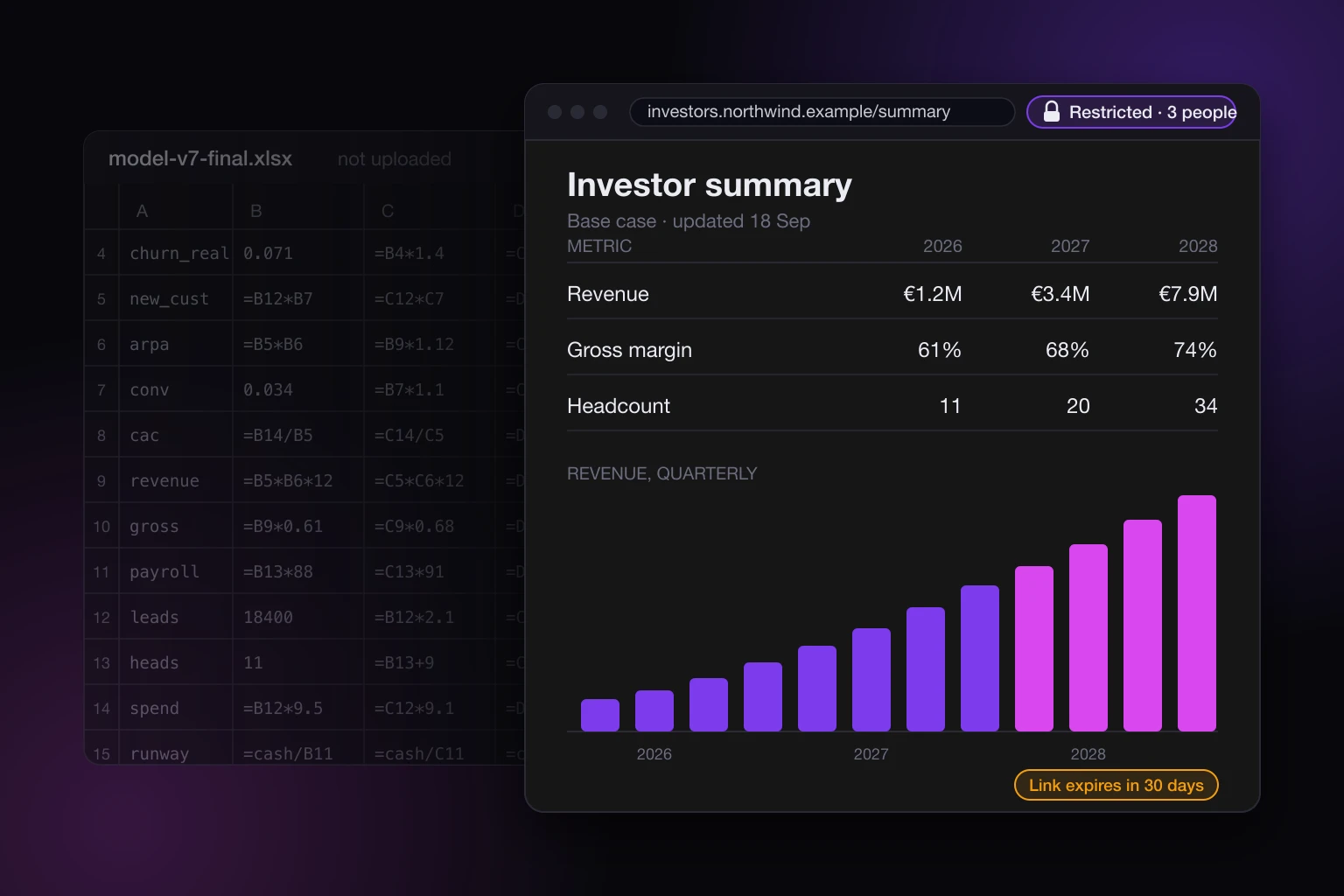
You built the model. Three years of projections, a hiring plan, a pricing scenario or two, and every number in it comes from a formula you tuned over a month. Now an investor, a board member, or a client wants to see it, and the only shape it has is the spreadsheet itself. The way to share a financial model without sending the spreadsheet is to have your AI turn the outputs into a page, publish that page privately, and keep the workbook on your machine.
This post walks through what that looks like in practice, what a private page does and does not protect, and where the honest limits are.
How to share a financial model without sending the spreadsheet
Ask your AI to build a page from the model's outputs, not from the model. The page carries the numbers you decided to show: a summary table, a revenue chart, the assumptions behind each scenario, a short note on what changed since last time. The formulas stay in the workbook. Then publish the page as a private site, name the people who may open it, and send them the link.
With SnapHost that is one instruction to Claude or whichever assistant you use. On Pro, a new site is created as a restricted share unless you ask for something else, so the link only works for the email addresses you put on the list. The person opening it confirms their email first, and the page loads only if the address matches. The workbook never has to be uploaded, because a page built from the outputs is what you wanted to send anyway.
SnapHost can also publish an Excel file as it is, as a grid with sheet tabs, and that is fine for a finished table. For a model it is the wrong send, for two reasons. Every sheet you have not hidden shows up, so you are back to editing the file to decide what the reader sees. And a workbook written by an AI tool or a script usually carries no computed values, so its formula cells show the formulas themselves until someone opens the file in Excel or Numbers and saves it once. The file itself is not offered for download unless you choose to offer it, but formulas on the page are enough to give the model away.
What a spreadsheet gives away that a page does not
A spreadsheet is the model. Whoever has the file has every formula, every hidden sheet, every assumption you tucked into a cell off to the right, and the version history if the file was ever synced. Sending it is not "sharing the numbers", it is handing over the machine that makes the numbers.
Some of that is fine between co-founders. Most of it is not fine with a prospective investor who is also talking to your competitor, or a client whose finance team will forward the file to whoever asks. Once a workbook is out, it is a copy, and a copy has no owner.
A page built from the outputs shows what you chose to include. The reader gets the projection, the chart, the scenario comparison, and the assumptions you wrote down on purpose. They do not get the cell that says what you really think churn is, because you never put it on the page.
Building the page from the model
The workflow is short. Export or paste the parts of the model you want to show, give them to your AI, and ask for a page. A good prompt names the audience and the shape: "Build a one-page investor summary from these projections: a headline table for three years, a revenue chart, a scenario switch between base and upside, and the list of assumptions. Plain HTML, no external services." The result is a single file that renders anywhere.
Two things to be careful about here, because the AI will not be.
First, check the numbers against the workbook. An assistant transcribing a table can round, drop a row, or shift a column, and a wrong figure in front of an investor is worse than no figure. Read the page next to the sheet before anyone else sees it.
Second, decide what logic goes into the page. If you ask for a scenario switch or a slider, the AI will write a little arithmetic into the page to make it work. That arithmetic is part of the page, and anyone who can open the page can read its source. Put only the relationships you would be comfortable explaining out loud. The full model, with its real drivers, stays in the file.
Publishing it privately
Once the page reads right, tell your AI to publish it. With SnapHost connected, the assistant publishes the page and comes back with a link; there is no export, no upload step, and no hosting to set up. You can keep the site as a draft while you review it, and nothing is reachable until you publish.
Then decide who gets in. On a restricted site, only the people you name can open the link, and each one confirms their email before any content loads. You can name individual addresses like partner@fund.example, or a whole company at once with its domain, so the entire deal team at one firm gets in without a list of names. Add and remove people whenever you like; a removed address stops working the next time it is checked.
If a page is going to one person for one look, a one-time link lets them open a restricted site once, with no sign in and no password. It has to be opened within seven days and works for a single sitting of about an hour, and it is spent after that.
The sharing docs cover the rest: a view password, access requests from people not on the list, and taking a site offline without deleting it.
Put a deadline on it
Fundraising conversations end. Board packs go stale. A financial model that was accurate in September should not still be readable by a fund that passed in October.
Give the link an expiry. After the date you set, the link stops working for everyone, and you can clear the deadline later if the conversation picks back up. A site shows whether its link is active, expiring soon, or expired, so you are not left wondering which of last quarter's pages are still open. If you want the model to stay available to your board but not to a prospect, keep the board on the list and let the prospect's link lapse.
Update in place instead of resending
Models change. You close a customer, the hiring plan slips a quarter, the churn assumption finally gets real data behind it. With a spreadsheet, every change means another attachment, and now three versions of your model are sitting in other people's inboxes, and you do not know which one they are looking at.
With a hosted page, you update the site and the link stays the same. Every update is saved as a version, so you can see the history and roll back to an earlier one if a change went wrong. The rollback is saved as a version too, so nothing is lost in either direction. The person you shared it with opens the same link they bookmarked and sees the current numbers. If they want to know what changed, you can say so on the page itself, in a dated note at the top, which is a far better experience than "see attached, v7 final FINAL".
Know who looked
When you send a spreadsheet, you learn nothing about what happened next. When you share a private page, SnapHost records every request, verification, view, and denial, so you have a history of who reached the site and when. That is useful in a raise: it tells you which partner at the fund actually opened the summary, and whether the address you were told to use ever verified at all. What the log shows and what it cannot tell you is the subject of what an access log for a shared page tells you.
If you want questions to come back through the page rather than by email, the data layer on Pro lets a published page save entries with no backend, so your AI can add a small "ask a question" box whose submissions land in the Data tab of your dashboard. It is optional. For most people the log and a reply address are enough.
What this does not protect
A private page controls who can open it. It does not control what they do once it is open. Anyone who verifies and views the page can screenshot it, print it, copy the numbers into their own sheet, or read the page source, including any scenario arithmetic you let the AI put in. Treat the page the way you would treat a slide you put on a screen in a meeting: shown to people you chose, not sealed.
The workbook is protected by not being there. That is the whole point of building the page from the outputs. Nothing on SnapHost's side makes a spreadsheet safe to send; the safety comes from never sending it.
And a note on plans, so there is no surprise at checkout. Link expiry, version history, the data layer, and an allowlist longer than three names are on Pro, which is 19 euros per member per month, where a member is someone who can publish. The people you share with are viewers, and viewers are free and unlimited. On Free, a site is public or private to up to three people you name, hosted on sites.snaphost.ai, carries a watermark, and you get three sites a month, which is fine for a rough draft and wrong for anything with your projections on it. The pricing page has the full comparison.
Where this fits
If you have read what to send a client instead of a zip file, this is the same idea applied to the one file people are most reluctant to send. The spreadsheet is the source. The page is the deliverable. Keep the first, share the second, and decide who gets to open it.
The publishing docs list what SnapHost accepts and how a site goes from draft to live, and the versions docs cover updating a page in place and rolling it back when a change should not have shipped.