
Share an AI Prototype for User Testing
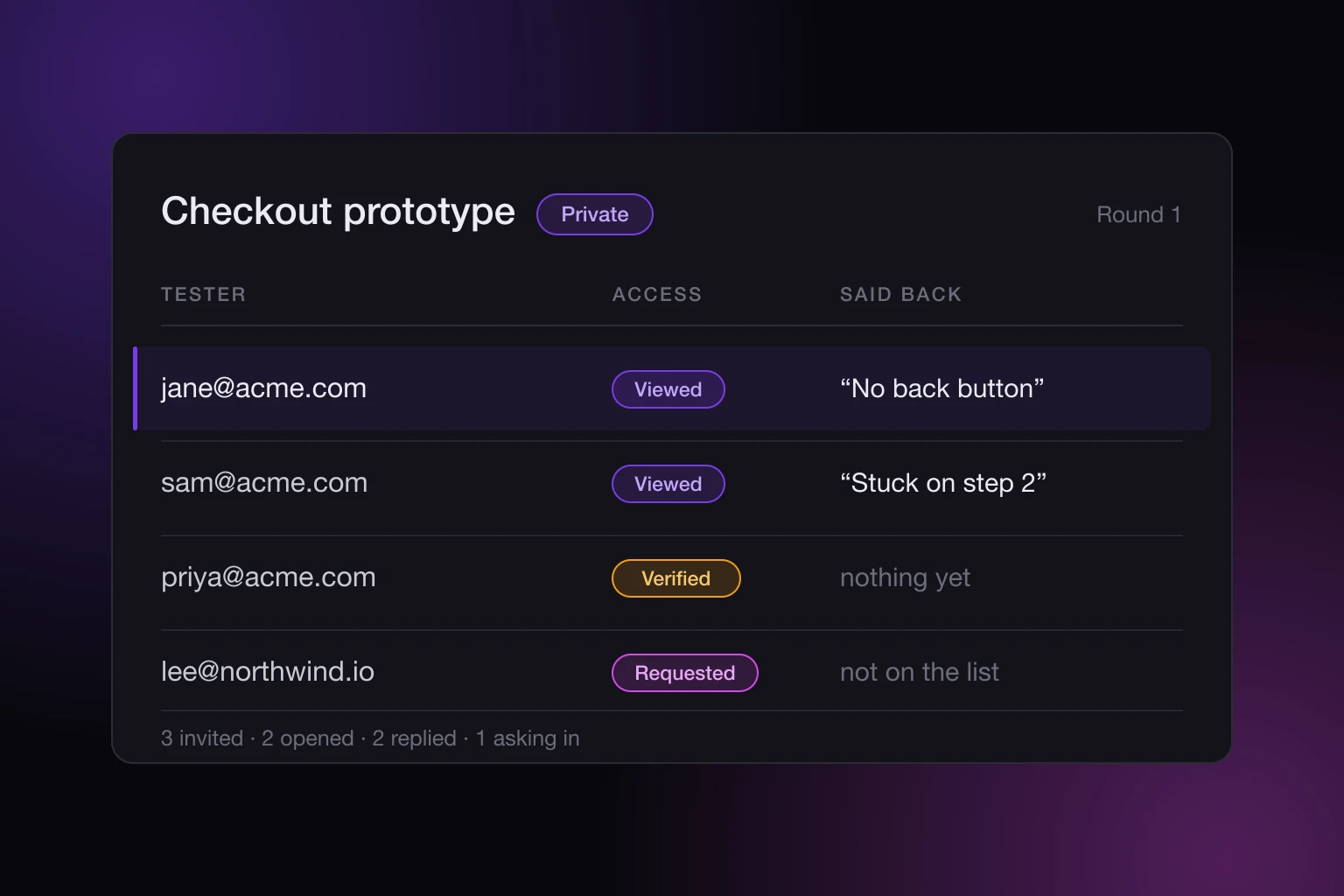
You built a prototype with an AI assistant and now you want eight people to try it. The prototype is the easy part. Getting it in front of exactly those eight, keeping it away from everyone else, knowing who actually opened it, and getting their reactions back without bolting a survey tool onto the side: that is the part nobody built for you.
How to share an AI prototype for user testing
Publish the prototype as a private site, put your testers' addresses on its allowlist, and give the page somewhere to save what they do. That is three settings and no infrastructure. The site is private, each tester confirms their email before any content loads, and the published page can write records through a helper that is already there, with no server of your own. You send one link. It works for the people you named and nobody else, and the site keeps a record of who reached it.
The rest of this post is what each of those parts actually does, including the places where it does less than you might assume.
What goes wrong when you send the file
The usual options all fail in the same place. A zip file makes the tester do work before they can look at anything, and half of them will open it wrong. Screenshots are not a prototype: you learn nothing about what someone does when they can click. A public drop host gives you a URL that anyone with the link can open, which is fine until you are testing pricing, or an unreleased feature, or something with a real customer's name in it.
And none of those tell you whether a person opened the thing. You send the link, you get silence, and you cannot tell whether the silence means "did not like it" or "never clicked".
Decide who gets in before you send anything
On a private site you keep an allowlist. Add exact addresses like jane@acme.com, or allow a whole company at once with a wildcard like *@acme.com. Anyone on that list confirms their email before content loads, so being forwarded the link is not the same as being able to open it.
Someone who is not on the list is not simply blocked. They can ask for access, the request shows up for you, and you approve it (which adds them to the allowlist) or turn it down. For a testing round that is genuinely useful: your five recruited testers pass straight through, and the sixth person one of them told about it becomes a decision you get to make instead of a leak. The full set of controls is in the sharing docs.
The password is a second way in, not a second lock
Worth knowing before you reach for it. You can put a view password on any site, but on a private site the password does not stack with the allowlist. It is an alternative route, not an extra check. Someone with the password gets through without being on the list, and someone on the list gets through without the password.
So if you are testing something sensitive, pick one gate and mean it. Adding a password to a private prototype widens access rather than narrowing it, which is the opposite of what most people expect it to do.
What the access log tells you about a test round
Every request, verification, view, and denial is recorded against the site, with the viewer's address and when it happened. After a round you can see which of your testers actually opened it, which ones bounced off the verification step, and whether anyone you did not invite tried the link.
Be clear about what that is and is not. It is an attendance record. It does not tell you how long someone stayed, what they clicked, or where they got stuck. For that you need the page itself to say something, which is the next part. What an access log for a shared page tells you goes deeper on reading one.
Let the prototype collect what testers do
Every published page has a small built-in helper called window.SNAPHOST. Your page can save a record to a named collection and read records back, and the collection is created on the first save. There is no backend to run, no API key to manage, and no database to point it at.
For a testing round that usually means one collection and one form. A "what were you trying to do here?" box at the bottom of the screen. A thumbs up or down on each step. A record written every time someone reaches the end. You can ask your AI assistant to add it to the page it just built for you, in the same conversation.
Collections are private by default, which is the setting you want here: visitors can add entries, but only you can read them. One tester's blunt opinion is never visible to the next tester. You read them in the dashboard. The data docs cover the query options and the ready-made recipes.
Attaching a name to each piece of feedback
Anonymous feedback from eight people is much less useful than eight named reactions, because the follow-up question is where the real information is.
Ask the page who is viewing, and write that into the record yourself. On a private site that is the viewer's verified email, because they already confirmed it to get in. On a public site there is no identity, so entries stay anonymous. This is deliberate: the identity comes from the access gate, not from a name box a tester can type anything into.
State the prototype keeps in the browser
Prototypes usually hold some state, and published sites can use localStorage, IndexedDB, and the other standard browser storage APIs. Each site runs on its own isolated origin, so what one site stores cannot be read by another.
Two things to know before a test round. Browser storage is keyed to the viewing address, so a tester who opens the site once on a custom domain and once on its share link gets two separate stores and will look like they started over. And service workers are not supported yet: an app that registers one still runs, the registration is what does not take effect. If a tester's progress actually matters to you, keep it in the data backend rather than in their browser. The interactive apps docs have the details.
Closing a round without deleting anything
When a round is finished, you have three ways to end it and they are not the same. You can give the link an expiry date, after which it stops working, and sites show whether a link is active, expiring soon, or expired. You can remove individual testers from the allowlist while leaving the site up for everyone else. Or you can take the whole site offline without deleting it: the content and every setting are kept, and only the link is switched off until you bring it back.
For iterating between rounds, none of that is needed. Update the site in place and it keeps the same link, so round two goes to the same address round one did. If a change makes things worse, roll back to an earlier version and the link still does not move.
What it costs
Free covers three sites, hosted on sites.snaphost.ai with a SnapHost watermark, each public or private to up to three people you name. That is enough to run a round with three testers, but not this workflow at scale: a larger group and the data backend are on Pro.
Pro is €19 per member per month and is where this post lives: private sites, unlimited sites updated in place at the same link, version history with one-click rollback, the data backend, your own subdomain, member roles, and one invoice. The full breakdown is on the pricing page.
Ten minutes before you send the link
Publishing privately handles who gets in and who actually showed up. It cannot tell you why someone stopped halfway, and no access log will. Only the page can say that, so spend the last ten minutes of setup on one feedback box rather than on the link itself: a single text field near the point where you expect people to hesitate, writing to one collection, tagged with the viewer the gate already verified. That one box is usually worth more than the rest of the round.