
Why a Google Drive Link Is Not Access Control
You built a report, a dashboard, or a small app with your AI, and the fastest way to get it in front of someone is a Google Drive link. That works for storage. It is not access control. Drive's "anyone with the link" setting is a bearer key: whoever holds the URL gets in, and the URL is the only thing standing between your work and anyone it gets forwarded to.
This post goes through what each Drive sharing setting actually does, where it is genuinely fine, and what to use instead when the thing you made needs to be seen by a specific set of people and nobody else.
Why a Google Drive link is not access control
Access control means the system checks who is asking before it answers. A Drive link set to "anyone with the link" checks nothing. It is the same as leaving a document on a table with a note that says "if you found this, you may read it". Forward the link, paste it into a Slack channel, let it sit in an email thread that gets forwarded six months later, and every one of those people opens the file exactly as your client did.
Drive does have a real access-control mode. Set the file to "Restricted" and add named people, and each viewer has to sign in to a Google account with that address. That is a genuine check of who is asking. The reason so many people fall back to "anyone with the link" is that the restricted mode has friction: your client may not have a Google account on the address you invited, the request-access loop can take a day, and the person who forwards the file internally gets a wall of "you need access" emails.
So the honest summary: Drive can do access control, but the setting almost everyone reaches for when they are in a hurry does not.
What "anyone with the link" actually protects
It protects against people who do not have the link. That is it.
Google does not index those files in search, and the URL is long enough that nobody guesses it. Both are true and both are beside the point. The link does not leak by being guessed. It leaks by being sent. A link you share with a client ends up in their inbox, their notes, their chat with a colleague, and the export of that chat when they change jobs. None of those people are attackers. They are just not the people you chose.
There is also no timer on it. A named viewer on some Google Workspace editions can be given an expiry date. The "anyone with the link" setting has no expiry, so a link you shared for a two-week review works in two years unless you remember to go back and change the setting.
What Drive shows you about who opened a file
Very little, if you are on a personal account. Drive's activity panel lists edits, renames, and shares. A per-view log that says who opened the file, from where, and when, is a Workspace feature, and even there it covers Docs, Sheets, and Slides better than an uploaded HTML file or PDF.
That matters more than it sounds. When a client says "I never got the report", or a number you shared turns up somewhere it should not have, the first question is who opened it. With a public Drive link, the answer is a shrug.
Drive stores a page, it does not host one
Even when the access setting is right, Drive is the wrong container for a built page. Upload an index.html and Drive shows you the file: a preview of the source, or a download button. It stopped serving HTML files as web pages years ago. Your dashboard with its charts, your one-page site, your prototype with three screens, none of it runs. The client downloads a file, double-clicks it, and gets a broken page with missing styles because the CSS was a second file.
So the Drive workflow for AI-built work tends to collapse into one of two things: export everything to a PDF and lose the interactivity, or zip the folder and hope the client can unpack it. We wrote about what to send instead of a zip already; the short version is that a built page wants to be hosted, not stored.
What real access control on a shared page looks like
Take the parts Drive gets right in restricted mode, drop the Google-account requirement, and add the things a hosted page needs. That is roughly what SnapHost does, and here is the concrete behaviour, so you can judge it against Drive rather than against a slogan.
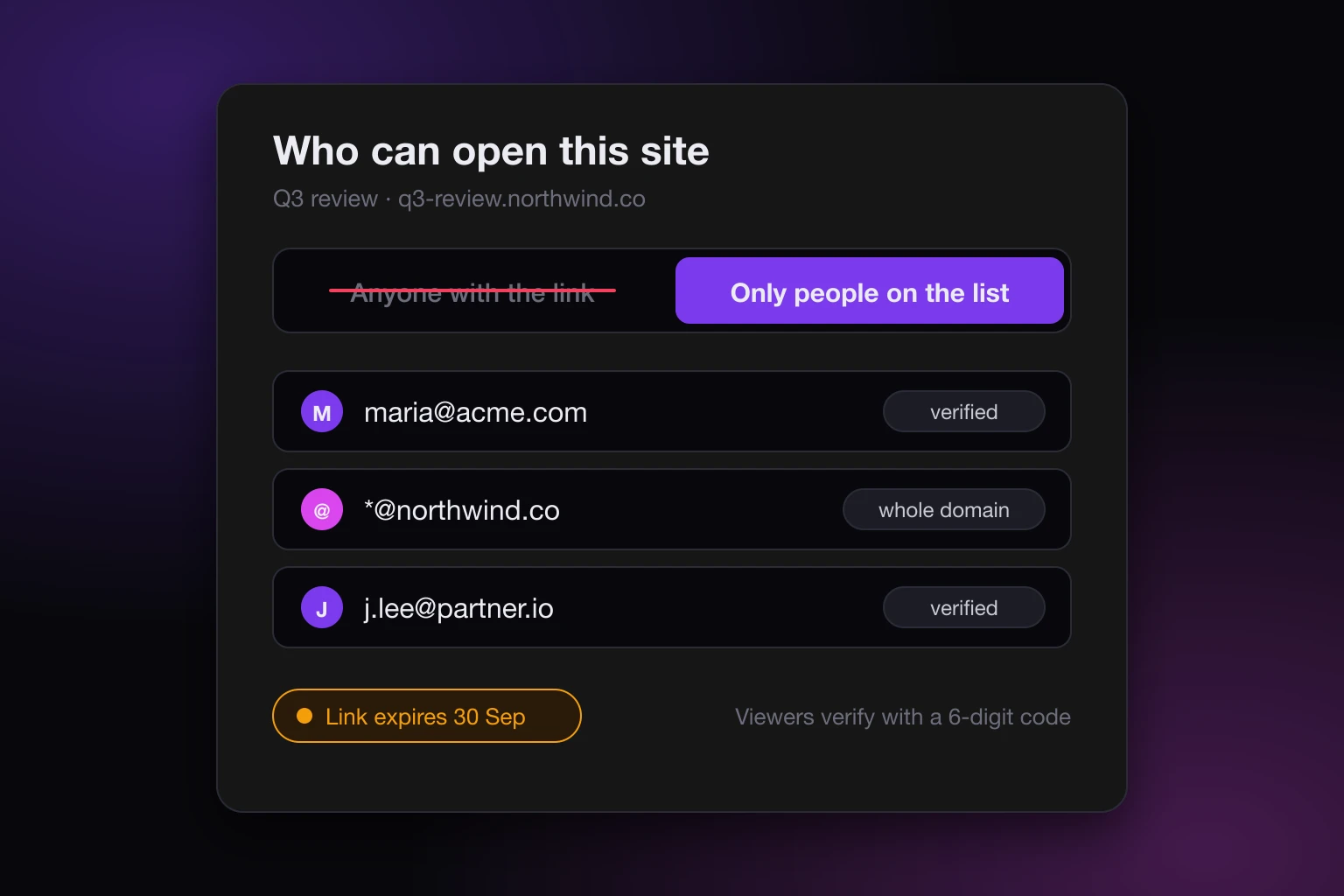
The viewer is checked, not the link. On a paid plan a new site is private by default. You add the people who may open it, either as single addresses or as a whole domain such as everyone at acme.com. When someone opens the link they enter their email, get a 6-digit code, and are in once they type it. No Google account, no SnapHost account, nothing to install. That verified identity lasts 14 days between visits and 90 days at most before they verify again.
Removing someone works on their next request. The list is checked on every view. Take an address off it and the next page load from that person is refused. There is no cached grant that outlives your decision.
Refusals are recorded. If someone enters an address that is not on the list, the attempt goes into the site's access log with the email they tried. The log also records each admitted view with the verified email, the IP address, and the browser. When a client says they never got it, you look, and you know.
A deadline is a setting, not a calendar reminder. You can put an expiry on the link. After that date the page refuses to load, for everyone, until you clear or move the date.
A password is available, but it is the weaker option. You can add a view password to a site. A correct password admits anyone who has it, which makes it a bearer key too, just a shorter one than a URL. It is there for the case where you cannot collect emails in advance. The allowlists vs passwords post covers when each is the right tool.
Someone not on the list can ask. On a paid plan the gate offers a request-access path. The request lands with you, and approving it adds the address to the list. That is the Drive request-access loop, minus the requirement that the requester has a Google account.
The details of the sharing model are in the sharing docs.
Where the page runs
A hosted page also needs to be somewhere. A SnapHost site is streamed from private storage with a short-lived delivery token and rendered in a sandboxed, isolated frame, so one page cannot read another or reach your account. The page itself is a real web page: HTML, Markdown, a PDF, a Jupyter notebook, or a zip of a multi-file app all publish as a live URL, as described in the publishing docs. The security page explains the isolation in more depth.
The part Drive users notice first is that nothing is downloaded. The client opens a URL and sees the page. No file to unpack, no broken styles, and on a paid plan no "which version is this": the link stays the same when you update the page, and every update is kept as a version you can roll back to.
What Drive still does better
Being fair about this matters, because the wrong tool for the job is expensive in both directions.
If the thing you are sharing is a document people need to edit together, Drive wins and it is not close. Comments, suggestions, simultaneous editing, and the version history of a Google Doc are the product. SnapHost publishes what your AI built; it does not turn it into a collaborative editor.
If your whole audience is inside one Google Workspace, restricted Drive sharing with your domain is already access control, and it is free. The friction we described above mostly bites when the audience is outside your organisation: clients, candidates, investors, a partner team on a different mail provider.
And if the file is genuinely fine to be public, a Drive link is a perfectly good way to hand it out. The problem is not Drive. It is using a storage link as if it were a permission.
Cost, so you can decide
SnapHost's free plan publishes 3 sites on sites.snaphost.ai, with a watermark, each public or private to up to three people you name. Three named readers is already more access control than a Drive link gives you.
Naming more than three, passwords and end dates are on Pro, at €19 a month per member who can publish. Viewers are free and there is no limit on them, so a consultant sharing with forty clients pays for one seat. Plan details are on the pricing page.
A rule you can actually follow
Ask one question before you share: if this link is forwarded, is that fine?
If yes, use whatever is fastest. A public Drive link, a public SnapHost site, an attachment.
If no, the link has to check who is opening it, and you want a record of who did. Restricted Drive sharing gets you there when everyone has a Google account and the thing is a document. When it is a page your AI built and the audience is outside your organisation, publish it privately, put the addresses on the list, set a date if the review has one, and stop relying on the URL to keep a secret.